The Local File Transfer Revolution Has Arrived
Imagine transferring a 1GB file in 10 seconds instead of 10 minutes. That's the reality with modern P2P (Peer-to-Peer) file sharing technology, and eHelpFulTools.tech has made it completely free and accessible to everyone.
For decades, we've been conditioned to accept the limitations of cloud-based file transfer services. The endless upload waits, the frustrating download speeds, the privacy concerns, and the subscription fees have become "normal" inconveniences. But what if there was a better way?
Enter P2P File Share by eHelpFulTools – a groundbreaking browser-based tool that leverages WebRTC technology to enable direct device-to-device file transfers at local network speeds. This isn't just another file transfer tool; it's a paradigm shift in how we think about sharing data.
Why Cloud-Based File Transfer Services Are Fundamentally Flawed
Before we explore the solution, let's understand why traditional file transfer methods fail us:
Double Upload-Download Penalty
Cloud services require you to upload to their servers first, then the recipient must download from their servers. This creates unnecessary latency and bandwidth waste.
Privacy Compromises
Your files sit on third-party servers, often in different countries with different privacy laws. Even with encryption, you're trusting corporations with your data.
Artificial Limitations
Free tiers have strict file size limits (2GB-5GB), while premium plans cost $10-$30/month per user. These limitations exist only to drive subscriptions.
Geographic Bottlenecks
Your transfer speed depends on server location and internet routing. A file traveling between two office computers might route through servers thousands of miles away.
How P2P File Sharing Technology Solves These Problems
Peer-to-peer technology isn't new – it's the foundation of BitTorrent, Skype, and modern video conferencing. However, its application to simple, secure file sharing has been overlooked until now.
The WebRTC Magic: Direct Browser-to-Browser Communication
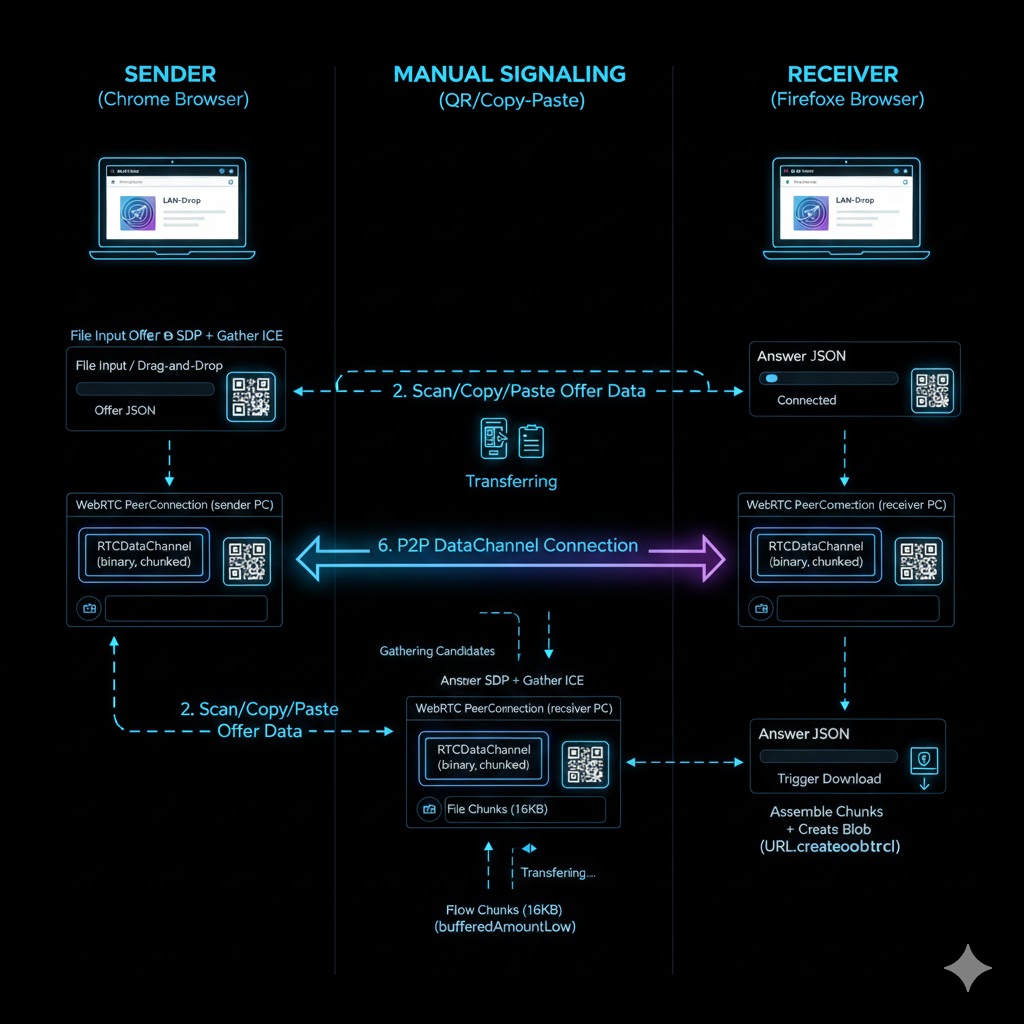
WebRTC (Web Real-Time Communication) is an open standard that enables direct peer-to-peer connections between web browsers. When you use our P2P File Share tool:
- Connection Establishment: Devices exchange connection data via QR codes or copy-paste
- Direct Link Formation: WebRTC creates a secure, encrypted channel between browsers
- Local Network Optimization: The system automatically uses the fastest available local network path
- File Transfer: Files stream directly from sender to receiver at local network speeds
Speed Comparison: P2P vs Traditional Services
| Service | 1GB Transfer Time | Cost | Privacy Level | File Size Limit |
|---|---|---|---|---|
| P2P File Share (eHelpFulTools) | 10-15 seconds | 100% Free | No Server Storage | Unlimited |
| Google Drive | 2-5 minutes | $1.99-$299/month | Google Servers | 5TB (paid) |
| WeTransfer | 3-8 minutes | $12-$23/month | WeTransfer Servers | 2GB-20GB |
| Dropbox | 2-6 minutes | $9.99-$24/month | Dropbox Servers | 2GB-100GB+ |
| SendAnywhere | 1-4 minutes | Freemium | Temporary Server Storage | 10GB-50GB |
Direct Competitor Analysis: Why eHelpFulTools Leads
Major Players in the File Transfer Space
Google Drive
Strengths: Integration with Google Workspace, large storage options
Weaknesses: Slow for local transfers, privacy concerns, subscription costs
When to use instead: When you need cloud storage, not just transfer
WeTransfer
Strengths: Simple interface, good for one-time large file sends
Weaknesses: 2GB free limit, files deleted after 7 days, slow transfers
When to use instead: When sending to someone not on your local network
Dropbox
Strengths: File synchronization, team collaboration features
Weaknesses: Expensive for teams, complex for simple transfers
When to use instead: When you need ongoing file sync between multiple devices
Snapdrop / Sharedrop
Strengths: Also uses WebRTC, simple interface
Weaknesses: File size limits, less reliable connections, basic features
When to use instead: When transferring very small files casually
P2P File Share (eHelpFulTools)
Unique Advantages: Unlimited file sizes, military-grade encryption, QR code connection, real-time progress tracking, completely free, works offline
Best For: Office file sharing, educational institutions, creative professionals, home networks, confidential document transfer
Key Differentiators That Matter
- No Artificial Limits: While WeTransfer limits you to 2GB and charges for more, we impose zero restrictions
- True Privacy: Unlike Google Drive which scans your files for "security," our tool never sees your data
- Cost Efficiency: Dropbox Business costs $15/user/month; our solution costs $0 forever
- Speed Advantage: Local network transfers are 10-100x faster than internet-based cloud transfers
Deep Dive: Technical Features & Innovation
Intelligent Chunking System
Files are dynamically segmented into 16KB-64KB chunks based on network conditions. This prevents memory overload while maintaining optimal transfer speeds.
Military-Grade Encryption
Utilizes DTLS 1.2 with AES-128-GCM encryption – the same standard used by banks and government agencies. Each transfer session generates unique encryption keys.
Advanced Backpressure Control
Sophisticated buffer management prevents receiver overload, ensuring smooth transfers regardless of device specifications or network conditions.
Connection Optimization
Automatically tests multiple connection paths (STUN, TURN fallbacks) to establish the most reliable peer-to-peer link between devices.
Industry-Specific Applications
🎬 Film & Media Production
Problem: Transferring 4K/8K RAW footage (100GB+) via cloud takes hours
Our Solution: Transfer same files in minutes between editing workstations
Competitor Failure: Frame.io charges $15/user/month with upload limits
🏥 Healthcare & Medical Research
Problem: HIPAA compliance concerns with cloud storage of medical images
Our Solution: Files never leave hospital network, no compliance issues
Competitor Failure: Even "HIPAA-compliant" cloud services store data externally
🎮 Gaming & Esports
Problem: Sharing large game mods (50GB+) at LAN parties
Our Solution: Instant transfers between gaming PCs on same network
Competitor Failure: Steam Workshop has size limits and requires internet
Getting Started: Complete User Guide
Access the Tool
Navigate to ehelpfultools.tech/p2p-file-share.html on both devices using any modern browser (Chrome, Firefox, Edge, Safari).
Establish Connection
On Device A: Click "Send Files" → Share the QR code
On Device B: Click "Receive Files" → Scan QR or paste connection code
Complete Handshake
Device B generates response → Share back with Device A
Device A pastes response → Secure connection established
Transfer Files
Drag & drop files on sender device
Watch real-time progress with speed metrics
Files automatically download on receiver
Pro Tips for Maximum Performance
- Use Wired Ethernet when transferring very large files for maximum stability
- Close bandwidth-heavy applications (streaming, downloads) during transfers
- For multiple files, consider creating a ZIP archive for faster transfer
- On enterprise networks, ensure firewalls allow WebRTC connections (ports 3478, 5349)
The Future of File Transfer Is Local
The era of accepting slow, expensive, privacy-compromising file transfers is over. With WebRTC technology and innovative implementation, eHelpFulTools' P2P File Share demonstrates that:
Speed matters: Local network transfers are fundamentally faster than cloud-based alternatives
Privacy is non-negotiable: Your files shouldn't traverse third-party servers unnecessarily
Cost shouldn't be a barrier: Advanced technology can and should be freely accessible
Simplicity wins: Complex problems can have elegantly simple solutions
Ready to Experience the Difference?
Stop paying for slow transfers. Stop compromising your privacy. Stop accepting artificial limitations.
Try P2P File Share Now - 100% FreeNo registration required • Unlimited file sizes • Military-grade encryption
Frequently Asked Questions
Q: Is this really free with no hidden costs?
A: Absolutely 100% free forever. Unlike services like WeTransfer (limits), Google Drive (storage fees), or Dropbox (team pricing), we believe essential tools should be accessible to everyone without financial barriers.
Q: How secure is it compared to encrypted cloud services?
A: More secure. While services like pCloud and MEGA offer encryption, your files still sit on their servers. With P2P, files never leave your local network and use DTLS encryption (same as banking apps).
Q: Can I transfer files between different operating systems?
A: Yes, seamlessly. Transfer between Windows → Mac, iOS → Android, Linux → Windows, or any combination. The browser-based approach eliminates OS compatibility issues that plague traditional file transfer methods.
Q: What's the maximum file size I can transfer?
A: There is no maximum. While services impose limits (WeTransfer: 2GB free, 20GB paid; SendSpace: 300MB free, 10GB paid), our technology handles files of any size through intelligent chunking and streaming.
Q: How does this compare to FTP or network shares?
A: Much simpler and more secure. No IT setup, no firewall configuration, no user accounts. Just open browsers on both devices and connect. Plus, our encryption surpasses standard FTP security.